Doctor Mobile Number update
- Download your client master by logging in to PRx cloud on the web, by navigating to Master -> Client and click on Action -> Download.
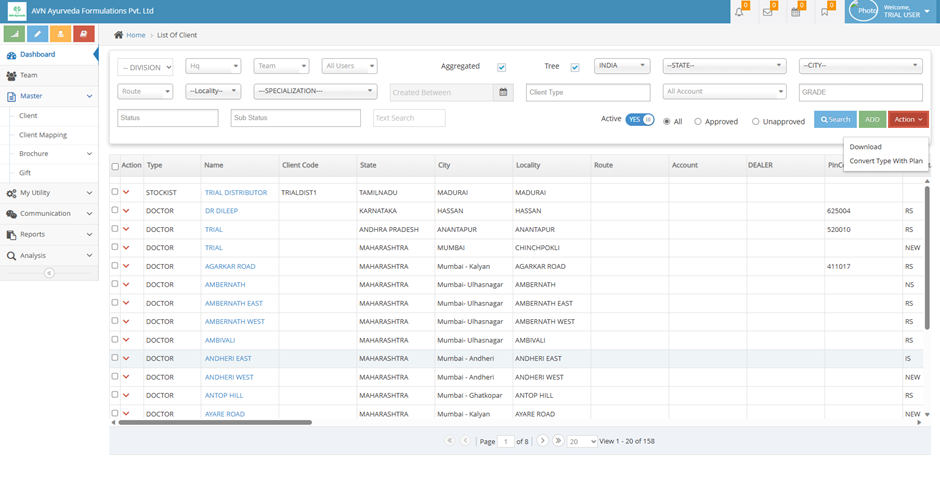
- You doctor master will be downloaded as a spreadsheet. Select the doctors for whom you want to update the mobile number and copy their IDs (Column A in the downloaded spreadsheet)
- Go to https://forms.zohopublic.com/avnayurvedaformulations/form/DoctorsMobileNumberUpdate/formperma/jnSble-W_HjLOlA5PGbFlAt18REb9eMRcQMB6PIjXFE
- Enter your name, enter the Party ID and Mobile number in the form. (Note – you can add as many parties as you want in this form, but it should belong to one user).
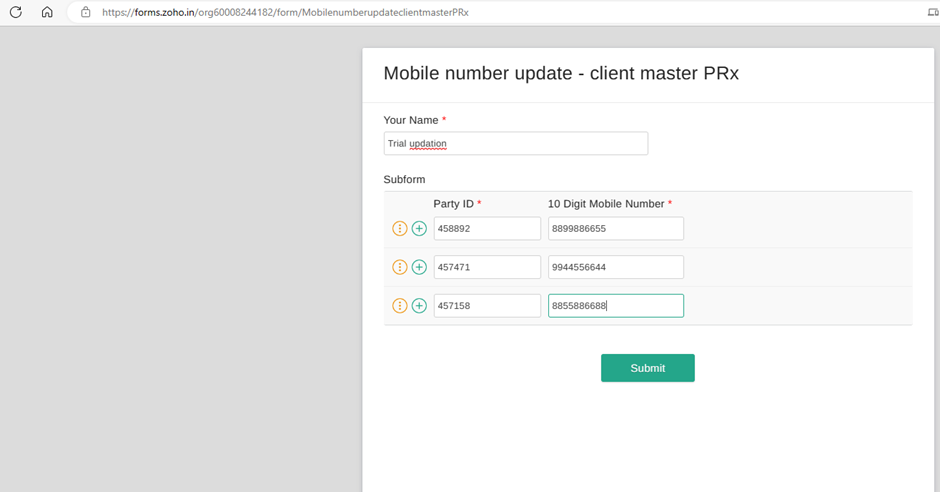
- Once you have added all the doctors for whom mobile number is to be updated, click on Submit. The details will be added to your client master within 24 working hours.
Related Articles
Reimbursement request process
1. Submit a request If a doctor has purchased an eligible quantity of a product from a distributor and you have the invoice copy with you, submit a request for reimbursement by following the steps below. Step 1 Login to the PRx app, Click on Client - ...
Medical Camps and Try the Product Camps process
1. Add the doctor to the campaign STEP 1 Login to the PRx app, click on ≡, then click on campaign. STEP 2 Select campaign to add the doctor to, from the list of campaigns applicable to you. STEP 3 Click on , then select the potential doctors to be ...
Grading process - FY 2023-24
Go to PRx App (prxcloud.com); Login with your username and password. Go to Master -> Client Mapping and follow the steps. Step 1 - Medical Camp Doctors Identify doctors for whom Medical Camp has been conducted in FY 2022-23. Grade them as ...